
Live business analyst for Teams & Zoom
Note-takers record. Ava writes the requirements.
Ava joins your Teams or Zoom call as a named participant. She asks who owns what and pins down acceptance criteria while the room can still answer, then hands you a BRD, user stories, and a RAID log when you hang up.
$39/month, billed today · 120 meeting hours · First meeting refunded if it isn’t useful · Cancel anytime
- Microsoft Teams
- Zoom
- Guest join, no IT install
- Never used to train AI models
- Demo needs a free account, no card
Live · Requirements workshop
- Maya · Ops lead
Ops needs yesterday's tickets by region, ready before 9 AM.
- Ava
Is 9 AM a hard deadline, or just start of day?
- Maya · Ops lead
Hard deadline — SLA reviews start at 9 sharp.
- Sam · Engineering
Heads up: the export breaks when a region has no tickets.
- Ava
Who owns that fix, and by when?
- Sam · Engineering
Mine — I'll have it fixed by end of sprint.
The record — filed live
- 00:12Requirement
Regional ticket report ready by 9:00 AM
- 00:19Decision
9:00 AM is a hard SLA deadline
- 00:26Risk
Export fails on empty regions
- 00:34Action
Fix empty-region export — Sam, end of sprint
Transcripts aren't requirements.
Tools like Otter and Fireflies are great at transcripts. Ava is built for the hard part of discovery — turning vague statements into requirements you can actually ship against.
- Records what was saidAsks what was missing
- Drops a summary after the callBuilds requirements during the call
- Generic AI meeting notesBA-shaped BRD, stories, and RAID
- Passive — listens onlyFacilitates — clarifies, confirms, captures
Side-by-side pages: Ava vs Otter, Ava vs Fireflies, Ava vs Sembly.
The signature
She asks the questions a good BA would.
Ava doesn't wait for you to notice the gap. She reads numbers back, chases owners, and turns “we should improve X” into something with priority and acceptance criteria — then captures it while the room agrees.
- Maya · Ops
We need better reporting for the ops team.
- Ava
When you say better — what does done look like for ops?
- Maya · Ops
They need yesterday’s tickets by region before 9am.
- Ava
Who owns that requirement, and is it a must or a should?
Discovery artifacts — ready when you leave.
Not meeting notes. The deliverables a working requirements session is supposed to produce, as Word files you can hand to delivery.
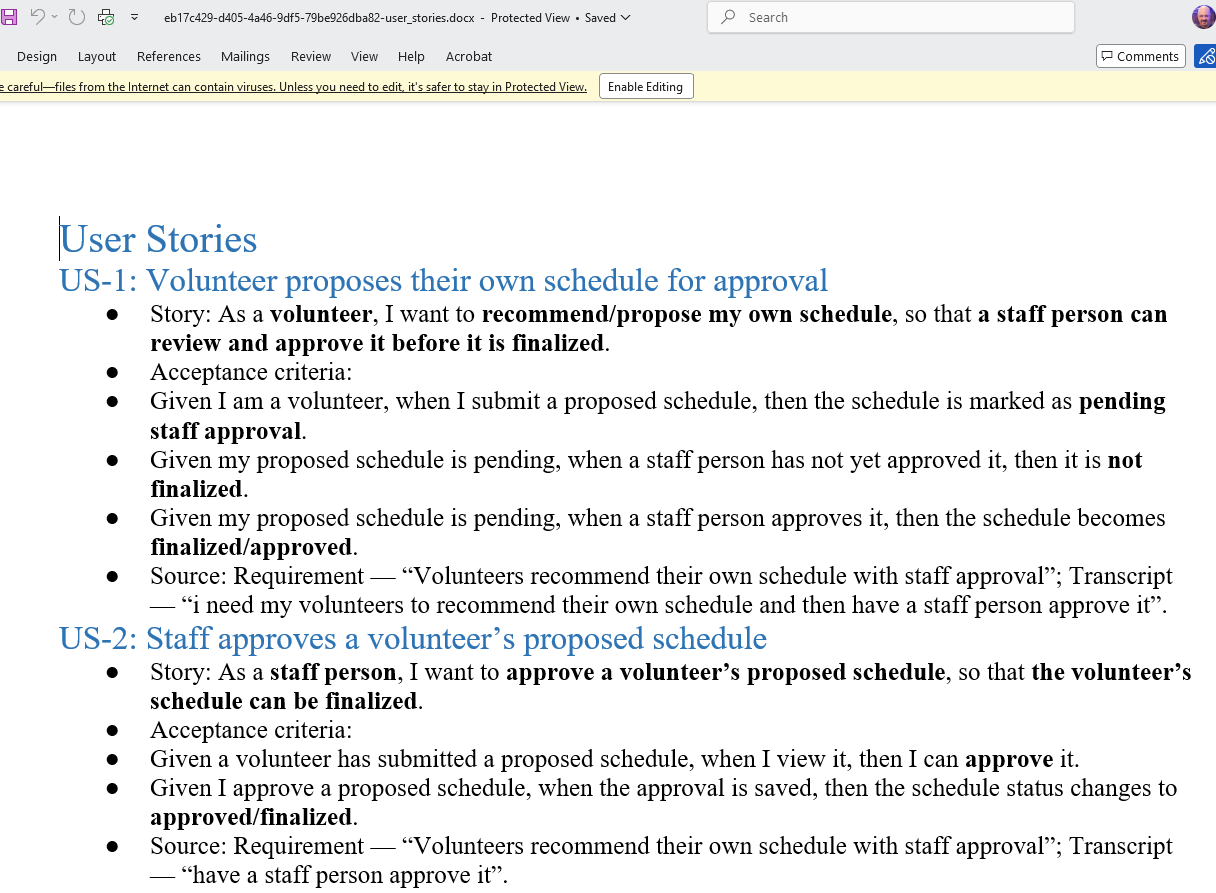
User stories with acceptance criteria
Given / when / then criteria for every story, each traced to the line in the transcript it came from.
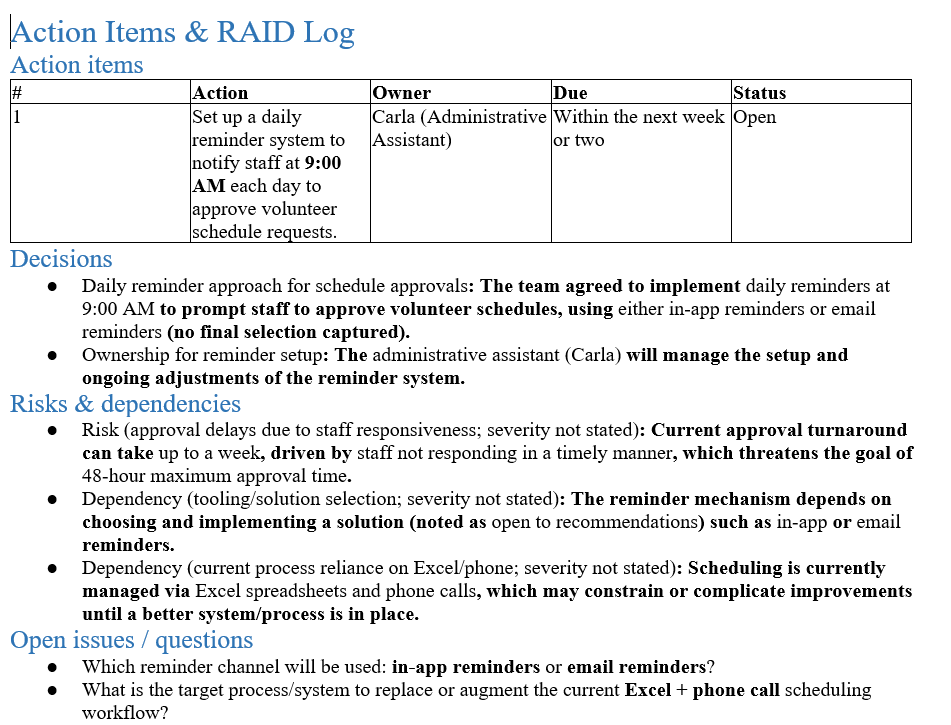
Actions & RAID log
Actions with owners, the decisions the room made, risks, dependencies, and the questions still open.
Try it on your own notes, no signup
Paste notes from a past meeting into the free BRD generator and preview the BRD and user stories Ava would write. Or download the sample from the ops-reporting workshop at the top of this page.
How Ava works
- 01
Paste a meeting link
Teams or Zoom join URL. Ava dials in as a named participant — voice by default, video avatar when you want a face in the room.
- 02
She facilitates
Clarifies, probes, and records as the discussion runs. Speak aloud as a facilitator, or stay silent and capture in on-demand mode — your choice.
- 03
You get the write-up
Summary, BRD-lite, user stories, and RAID log — grounded in what Ava captured with her tools during the meeting.
Built for live discovery work
If your calendar is full of requirements workshops and stakeholder interviews, Ava is the analyst seat you always wish had been in the room.
Business analysts
Run more stakeholder sessions without losing rigor. Ava keeps chasing clarity so you leave with requirements, not a transcript to re-read.
Consultants
Client discovery days move faster when someone in the room is always asking for owners, musts, and acceptance criteria.
Product & discovery leads
Turn interviews into backlog-ready stories and a RAID log while the conversation is still fresh — and still corrigible.

A note from the founder
I built Ava because I kept leaving discovery calls with a transcript and rewriting the Product Requirements Document (PRD) that night. She is in the room for the client sessions I still run — asking for owners and musts while the room can still correct her. She also captures the meeting summary and the RAID log.
Rich Huebner · Founder
LinkedIn profileOne plan · everything included
Less than one billable hour a month.
Pro replaces the evening you would spend rewriting the transcript into requirements. Billed by meeting time, not per seat.
First meeting refunded if it isn’t useful
Send Ava to one real call. If what you walk out with is not worth it, email us and we'll refund it. Cancel anytime from Billing.
What happens after you click
- 01
Create your account. No card needed for this step.
- 02
Confirm Pro in Stripe. Card or Apple Pay, billed today.
- 03
Paste your next Teams or Zoom link. Ava joins as a named participant and starts the record.
Pro
$39/ month
or $390 / year, two months free
- 120 hours of meeting time every billing period
- All 18 personas: BA, PM, scrum master, QA, architect, and more
- BRD, user stories, RAID log, and role-specific documents as Word files
- Facilitator mode, or on-demand mode where she stays quiet until named
- Teams and Zoom as a guest: no tenant install, no admin consent
$39/month, billed today · Full pricing
18 personas · all included in Pro
Discovery is where she starts, not where she stops.
Pick the seat Ava takes for each meeting. A scrum master chases impediments, a QA lead chases untested paths, an executive assistant stays silent and files the minutes — and each one writes its own documents afterwards.
Every persona is included on Pro. Compare all 18 personas and the documents each one writes.
Questions before you send her in
How is this different from Otter or Fireflies?
Those tools excel at transcripts and summaries. Ava joins as a business analyst: she clarifies vague statements, asks who owns what, and produces BA-shaped artifacts — BRD-lite, user stories with acceptance criteria, and a RAID log.
Can I try Ava before I pay?
Yes. Create a free account (no card) and talk to Ava in your browser for three minutes. Sending her to a real Teams or Zoom meeting needs Pro at $39/month, billed today. If that first paid meeting is not useful, email us and we will refund it.
What does Pro include?
120 hours of meeting time per billing period, all 18 personas, facilitator and on-demand modes, and every artifact as a Word download. A video avatar is an optional $149/month add-on; voice is the default.
Will she interrupt the meeting or embarrass me in front of a client?
Only as much as you want. In facilitator mode she asks short clarifying questions when something is vague or unowned. In on-demand mode — or with the General Notetaker and Executive Assistant personas — she stays quiet unless someone says her name, and still captures in the background.
Does my IT department need to approve anything?
No tenant install and no admin consent. Paste a join link; Ava dials in as an external participant the same way a guest would. That is the whole setup.
Is my client's meeting data used to train AI?
No. Transcripts and artifacts stay on your account. We do not use meeting content to train Ava or any third-party model. Delete a meeting from the dashboard, or email us to delete the account.
Do I have to tell participants she's recording?
Yes. Ava appears as a named participant. You are responsible for telling the room a note-taking / analyst bot is present, as required by local law and your client agreements. We spell this out in the terms.
Does Ava invent requirements?
No. She is instructed to only record what participants actually said, ask when something is unclear, and stay silent rather than fill gaps with guesses.
Can I correct what she captured?
Yes. The live record is editable in the dashboard — change titles, owners, and details before you generate or share artifacts.
What happens to my artifacts if I cancel?
You keep what you already generated. Cancel anytime from Billing; access continues through the paid period. After that, email us if you need an export or a deletion.
Put a business analyst in your next discovery call.
Paste a Teams or Zoom link and Ava joins as a named participant. She asks the clarifying questions, captures as you go, and leaves you with requirements you can hand to delivery.
$39/month, billed today · Cancel anytime
Rich Huebner, founderLinkedInMicrosoft TeamsZoomStripe
No tenant install · First paid meeting refunded if it is not useful